Engineering
Exploring the Evolution of React

Laxmi Lamichhane
April 18, 2024
React 19 is a significant release. It ships a compiler, new hooks for forms and data fetching, server components, and changes to how refs work. Here's what's actually in it and what matters in practice.
Why React 19 matters
React apps have gotten more complex since hooks landed in 16.8. Performance optimization — memoization, callback stability, re-render prevention — has become a large part of daily React work. React 19 tries to automate most of that. Whether it succeeds depends on your codebase, but the intent is clear: less manual optimization, more focus on product logic.
What's new
- React Compiler
This is the headline feature. The compiler analyzes your React code and automatically handles memoization. In theory, this eliminates the need for useMemo, useCallback, and React.memo in most cases. The compiler figures out what needs to re-render and what doesn't.
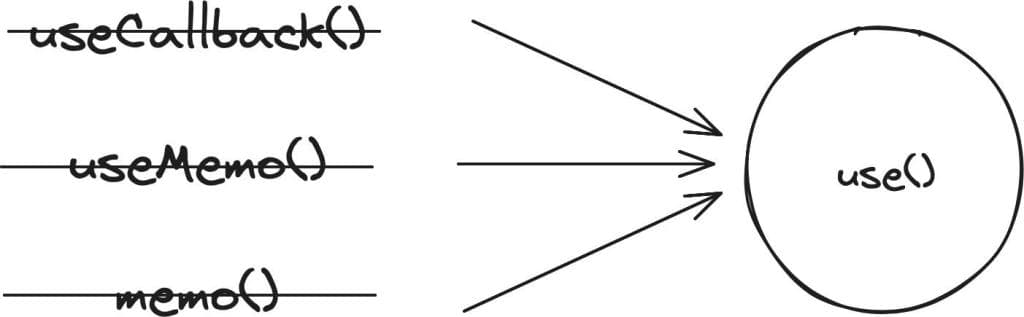
- The use() hook
A new multipurpose hook that can resolve promises and read context. Two practical changes:
- Context: Instead of
useContext(MyContext), you can writeuse(MyContext). - Data fetching:
use()can resolve a promise directly, which removes the need for a separate state variable anduseEffectfor simple fetch patterns.
const contextValue = use(MyContext);
- Refs as props
Functional components can now receive ref as a regular prop. No more forwardRef wrapper. This is a small change that removes a lot of boilerplate.
const ButtonExample = ({ ref, children }) => {
  return (

      {children}
    ;
  )
};
- Document metadata
Components can now render <title> and <meta> tags directly. React 19 hoists them to the document head automatically. This is useful for page-level SEO without reaching for a library like react-helmet.
const Page = () => (
  <>
    Code

  </>
);
- Actions
Actions handle form submissions and data mutations. They work with both synchronous and asynchronous operations, and they manage pending/error/success states automatically. They work on both client and server components.
When using an action, React manages the submission lifecycle and exposes state through useFormStatus and useFormState.
- Server components
React 19 formalizes server-side rendering with server components. Components can run on the server and send rendered HTML to the client, reducing the JavaScript bundle size. This was already available in Next.js, but React 19 makes it a first-class React feature.
Server components also improve SEO since search engines can read the fully rendered content without waiting for client-side JavaScript.
- Asset loading
Images and other assets can now load in the background while the user interacts with the page. React 19 provides controls for prioritization and lazy loading, which reduces the visible loading jank on image-heavy pages.
- New hooks
React 19 adds several hooks focused on forms and async state:
-
useOptimistic() — Updates the UI immediately before an async operation completes, then reconciles when the response arrives. Good for "like" buttons, comment submissions, and similar patterns where perceived speed matters.
-
useFormStatus() — Returns the current form submission state (pending, success, error). Useful for disabling submit buttons or showing loading indicators.
-
useFormState() — Manages state that updates based on form submission results. Replaces a lot of manual
useState+useEffectpatterns for form handling. -
useTransition() — Keeps the UI responsive during expensive state updates by marking them as transitions. The UI won't freeze while React processes the update in the background.
What this means in practice
React 19 reduces boilerplate. The compiler handles memoization. use() simplifies data fetching. Refs drop the forwardRef wrapper. Forms get dedicated hooks instead of manual state management. Server components ship less JavaScript to the browser.
Whether all of this works smoothly in existing codebases depends on how heavily they rely on patterns that the compiler needs to understand. New projects will benefit the most. Migrations will take some testing.
For a deeper look, check the official React 19 blog post or these video walkthroughs:
javascript
React
reactjs
typescript
web-development