Context accuracy
Measure how often tool responses match expected results for business-critical workflows.

Most integration issues in production AI systems are not model issues. They are context and tool-access issues.
Model Context Protocol (MCP) addresses that gap by defining how models request tools and data through structured, permissioned interfaces. This guide explains what an MCP server does, where it adds business value, and when to use a custom server versus an existing option.
An MCP server is a service that implements the Model Context Protocol. It acts as a controlled gateway between AI models and the tools, data sources, and systems a business relies on. Instead of manually copying data into prompts, MCP allows AI to request context through structured, permissioned interfaces.
In simple terms:
This approach creates a standardized, auditable, and secure way for AI to interact with real systems.
Most AI deployments still depend on fragile prompt engineering and manual context injection. That leads to critical limitations:
MCP addresses these issues by standardizing how context and tool access are provided to the model.
MCP uses a simple but powerful pattern:
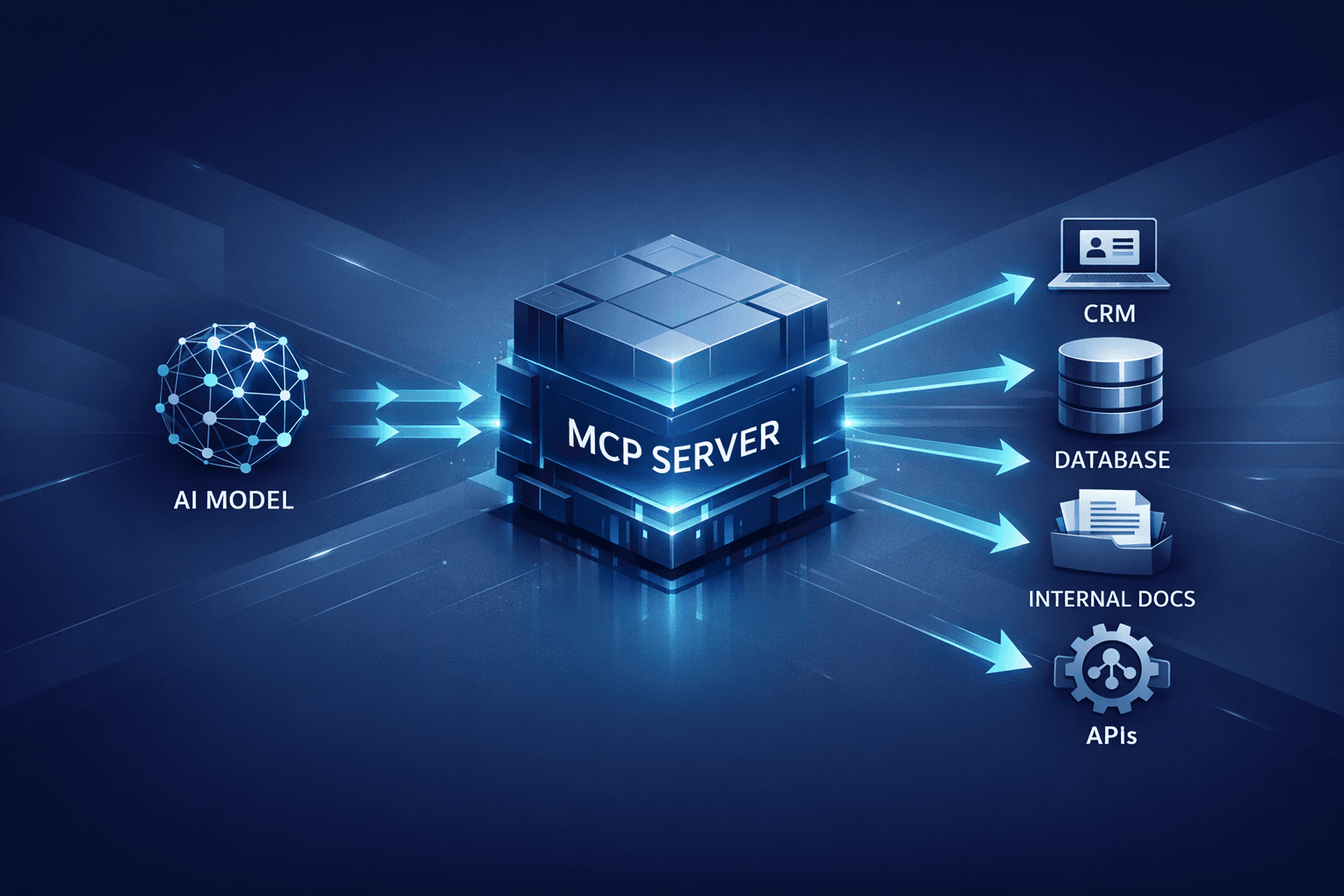
A visual architecture looks like this:
AI Model ↔ MCP Server ↔ Business Tools (CRM, Docs, Databases, APIs)
This separation keeps the model away from direct system access and provides a consistent interface for all AI workflows.
MCP is often confused with RAG and standard API integrations. These are complementary, not competing approaches.
A simple way to think about it: RAG is a tool. MCP is the protocol and infrastructure layer that makes tools safe, reusable, and auditable across AI workflows.
An MCP server typically includes the following layers:
These components make MCP a security-first way to operationalize AI.
MCP servers unlock high-leverage AI use cases that are difficult to deliver with basic prompt engineering.
Employees often lose time searching through policies, product docs, and process notes. With MCP, an AI model can query internal documentation securely and return verified answers with traceable sources.
Sales and support workflows can be augmented by an AI model that can read CRM records through MCP. The server enforces permissions and returns only what the model is allowed to see.
MCP enables the model to request structured data without direct database access. This protects the data layer while still enabling high-value analytics and reporting.
Teams can embed AI into internal dashboards, operations tooling, or analytics pipelines. MCP handles data access and tool invocation in a safe, reusable way.
Support bots and assistant experiences improve dramatically when they can access product documentation, feature flags, and account data. MCP provides the plumbing required for accurate, personalized responses.
MCP requests are structured and predictable, which makes them easier to validate and evaluate. A typical request includes:
crm.search_accounts)This structure is essential for enterprise AI reliability, and it enables stronger testing and monitoring.
The MCP ecosystem is growing quickly. MCP has been adopted by leading AI platforms and developer tools that require structured tool access for AI workflows. This includes major model providers and editor environments where tool use and retrieval are critical to user experience.
The common pattern across these products is the same: AI needs access to real systems, and MCP provides a consistent protocol for those connections.
Not every business needs to build a custom MCP server. The decision depends on data sensitivity, workflow complexity, and compliance requirements.
Custom servers deliver higher security and performance, and they make AI integrations reusable across products.
A practical MCP rollout follows a staged approach:
This phased approach reduces risk while ensuring measurable impact.
Even strong teams can stumble during MCP adoption. Avoid these common pitfalls:
Addressing these issues early increases trust in AI systems and reduces rework.
Traditional integrations often embed data into prompts or hardcode API calls into application logic. MCP replaces that with a more scalable architecture:
For organizations planning long-term AI adoption, MCP reduces integration debt and improves system reliability.
AI integrations involve sensitive data. MCP supports stronger security controls compared to ad hoc integrations:
These protections are critical in regulated sectors such as healthcare, finance, and enterprise SaaS.
Use this checklist to scope an MCP rollout quickly:
This checklist keeps MCP implementations aligned with reliability and security goals.
AI agents require more than retrieval. They need controlled access to tools, sequencing logic, and reliable outputs across multiple steps. MCP provides the backbone for that orchestration.
An agent workflow often looks like this:
Without MCP, each step becomes a brittle custom integration. With MCP, each step becomes a standardized tool call with clear permissions and structured responses. This improves reliability, reduces hallucinations, and makes the workflow easier to monitor and test.
For organizations investing in agent-based systems, MCP is essential because it enforces a consistent interface between the agent and the environment. That consistency is what makes agent workflows safe to scale.
Successful MCP deployments measure both technical health and business impact. Consider tracking:
Measure how often tool responses match expected results for business-critical workflows.
Track how frequently the AI workflow completes without human intervention.
Monitor end-to-end time from request to response across your highest-value flows.
Calculate API and compute spend for each completed workflow to protect ROI.
Track the percentage of tool calls with complete, searchable logs for compliance.
These KPIs help demonstrate ROI and surface gaps in tooling or data access.
MCP is not just a technical protocol. It is a business enabler that:
For companies investing in AI strategy for 2026, MCP should be treated as foundational infrastructure.
An MCP server is a service that implements the Model Context Protocol, allowing AI models to securely access tools and data through a structured, permissioned interface.
The model sends a structured request for context or tool access. The MCP server validates the request, calls the relevant tool, and returns a structured response the model can use to generate accurate output.
A custom MCP server is recommended when multiple systems must be connected, when data sensitivity is high, or when compliance and auditability are required. Off-the-shelf options may be sufficient for small, single-source workflows.
Costs vary based on the number of connectors, data sources, and security requirements. Simple deployments can be built quickly, while production-grade systems require deeper engineering for security, logging, and evaluation.
No. MCP helps any organization that needs AI to interact with real systems. Startups often adopt MCP to avoid brittle prompt hacks and to scale integrations as their product grows.
MCP server development sits at the intersection of security, data engineering, and AI product design. A well-implemented MCP server unlocks reliable AI workflows without exposing sensitive systems or creating technical debt.
Codse Tech helps teams design and build production-ready MCP servers, from secure connectors to evaluation harnesses. For organizations planning AI integration or agent-based systems, MCP is a critical building block.
See how AI features get integrated into existing SaaS and enterprise systems with secure, measurable delivery.
Explore serviceReview agent architectures, delivery models, and guardrail patterns for production-grade autonomous workflows.
Explore service